After searching for a plugin that might accommodate this in WordPress and coming up empty, I went
digging for a possible easy way to do this with the means available. Logic dictates that with
custom fields this should be rather easy to accomplish.
The only snag might have been that in retreiving a custom field for a page or a post you need the
page or post’s ID. Usually this id is readily available within “the loop”, but what about when
we’re up in the tags? A little searching in the codex reveals that we can grab your pages’ ID
with $wp_query->post->ID. Fantastic – because, with that we’re pretty much done! Adding the
following in your theme’s header.php file between … :
” />
” />
.. and “meta_keywords” and “meta_description” as custom fields with your desired content for each
will get you to where you want to be.

What a huge pain in the ass.
I just spent hours trying to get every combination of these two to work
together and nothing worked. A handful of versions of libmemcached had no
problems installing – .24, .25 and .26 were all easy to install, both from
source and from macports. However, getting the memcached gem to install proved
to be way way more difficult.I tried with a myriad of options – the most
promising piece of information looked to be from this gentleman’s website
– but also proved fruitless.The final solution, after a LOT of googling and
clicking around the rubygem forums – this post at Evan Weaver’s blog. The
libmemcached-0.25.14.tar.gz and memcached-0.13.gem tarball and gem,
respectively, installed easily without any problems. After downloading all I
had to run was:
tar -xzvf libmemcached-0.25.14.tar.gz
cd libmemcached-0.25.14
./configure && make && sudo make install
cd ..
sudo gem install memcached --no-rdoc --no-ri
Done. Finally.
Update: There seems to be a few issues with the gem I link
to being installed correctly in Snow Leopard. After spending too much time
trying to figure out why the gem wouldn’t install, I installed the current
memcached gem (from gemcutter) on a whim – and it compiled, and worked, without
a problem instantly. So, if you’re running Snow Leopard and looking to
install the memcached gem, try out the latest version first.One caveat – I’m
still using the memcached server I linked to above, version 0.25.14, still
from Evan Weaver’s site
#
In getting up to speed with the new bells and whistles in Rails 2.0s RESTful routing capabilities I ran into something that puzzled me. Of the options for a resource defined among your routes there were two similar pieces that, for one reason or another, I could just not find a solid and bulletproof explanation for – :collection and :member. The :member part of it I got pretty easily for some reason, because its description is inherent in its own name … “a member among the default restful actions”. The :collection part? Notsomuch. After some digging in the Rails mailing list I ran into a great, and worthy, explanation for this knucklehead by a contributer named “deegee”:
For example, with map.resources :reviews, if you want to add a method ‘delete_all’ that deletes all reviews at once. You may want to call that with ‘/reviews/delete_all’ and method PUT (never use GET to delete something). This method is acting on all resources (a collection), so the route should be:
map.resources :reviews, :collection => { :delete_all => :put }
If you want to have a custom action acting on a specific resource, e.g. ‘/reviews/3/give_rating’, then your action is on a member and the route would be
map.resources :reviews, :member => { :give_rating => :put }
So that’s it! They’re the same other than :member working on a single resource, while :collection works on multiple. DONE!
#
There’s a really great post at this blog about how the writer, a developer named Ethan, was approached by some acquaintances with regard to a big idea they needed help in implementing. The usual banter ensues, in which Ethan discusses the terms by which he expects to be compensated. Whether in equity or at an hourly rate of payment.
The response from his pitch-man?
Hey, so, we aren’t really prepared to pay. I mean there isn’t that much to it, it’s just a PHP website with a MySql database, I was hoping you could just throw it together as a favor. Oh well, thanks anyway
The rest of his post echoes pretty much exactly how I would feel in this situation. “There isn’t that much to it”. That line destroys me. To anyone that might ever make that assumption – take a moment to step back, and really think about what you’re saying. It blows my mind to think that there are people out there that are so quick to make the leap that “there isn’t much to” someone’s craft.
“Dear Mr. Architect – can you design this house for me for free? I mean, there isn’t much to it, it’s just a house with a foundation and some walls”.
On another semi-related note. If you’re looking for someone to jump in on an entrepreneurial venture – the challenge you should expect to be faced with is to find that one special, talented individual that might share the same passion as you on this particular topic. From my perspective – that’s the key. Passion. Unless it’s for pay, it’s hard for some to get truly amped to knock out the creative, or code, for your new project. I’ve tried the same approach – “Work with me on this! We’ll rule the world“. It’s too nebulous a proposition for most, unless they know they’re going to LOVE this thing you’re creating.
My conclusion – work my ass off for a little extra money to invest in the paid services of my friends to help me where the help is needed. I just can’t ever expect to get something knocked out of the park by someone who’s going on my word – “This is going to be HUGE!”. If my name was short for something like … Joelstradamus … then maybe I’d be more eager to prognosticate on the magnitude of my many “next pet project”s.
#
… can be an immense pain in the toochis. Actually, it is, unequivocally, an immense pain. You can’t hope to solve it, you can only hope to momentarily fend off. The ipod, camera, external hard drive, keyboard, mouse, power cable … all expected to live in peace and harmony in the vicinity of what is most likely a laptop.
I had just (temporarily) solved my problem when I ran into this product via Uncrate called the Space Station, from BlueLounge. It tucks all of your cables underneath a small stand to rest your laptop up against, to place a small monitor on top of, maybe? From only the photos on the BlueLounge website you get the feeling that this might be a winner for those trying to come up with a solution to their own exponentially multiplying cable problem.
Has it really been (well over) a year since I last posted a single thing on
this weblog? It goes without saying that that is a crying shame. Woefully
neglected is too soft a phrase to use when it comes to signifying how little
I’ve done with joeloliveira.com in the past year and a half. This site turned
into an abandoned wasteland – deserted and stagnant.
Why? It borders on cliche, and could probably be filed within the “cop out”
category, but for me it begins and ends with my not having the energy or
motivation to write for my own website when I got home from work. I probably
could have written a paragraph or two while from work, but never felt that was
fair to my employers. What about those hours outside of work? Surely there are
moments I could steal past 5 or 6ish to write something? Absolutely! But then
the question still remains -
What to write about? There are numerous topics I ponder in the course of a
day but for months – no one single target subject. I’ve usually just posted
whatever events I’ve attended, fun nights out with friends, stupid miscellanea
found on the internet – nothing of consequence for the majority of folks on the
internet. To my friends and family – of course I know it’s interesting to YOU,
but to communicate over the internet in such a blanket manner feels a bit too
detached.
What now? Well things have changed – drastically! A little over a month
ago I left my job at Molecular, an internet consultancy. The company I’ve left
to work for is a very small and fledgling little operation – my own company.
After months of preparation, nerve-wracked second guessing and laying
groundwork with hopes I could pull this off I actually did it. As difficult as
it was to leave such a great group of people at Molecular and all the
opportunity they’ve allowed me in the past three years I decided that it was
the right time to make this next big step.
So far, so good. I’m excited. I am already engaged with a local ad agency
helping them with a handful of their (immense) interactive clients. This
site is going to evolve into my portfolio for anyone looking for a resource to
bang out nice, clean, rich interfaces with XHTML, CSS, javascript, and other
interesting and challenging web-based technologies.
To give you an idea as to what types of things I’m involved with – The past
year and change I’ve actually been encouraging and helping Sara with [her own
weblog][2]. Have I not told you about it yet? For shame! [Go visit and take a
look][2] at the wonderful work she’s been doing. In addition to playing
occasional tech-support and copy editor for Sara I’ve been putting in most
spare hours working on my own project(s). Instead of writing about it – I’ve
been trying to DO it. Think it’s difficult to post on a blog every day? Try
doing it when you’re attempting to master new tools in addition to supporting
the users who are helping drive your new project. It’s not easy.
The ultimate end-game will be to afford myself the time to work on those few
previously mentioned projects that have grown over the past few years to
something I’m hoping could blossom into something beyond “pet project” status.
Once I’m a little more comfortable with their status I will post announcements
here.
In the meantime, this site will very occasionally feature commentary on the
things I find interesting about what’s going on in my industry, maybe some
personal anecdotes, and hopefully some useful original content. Let’s just hope
it’s not another 16 or 17 months until I write another post.

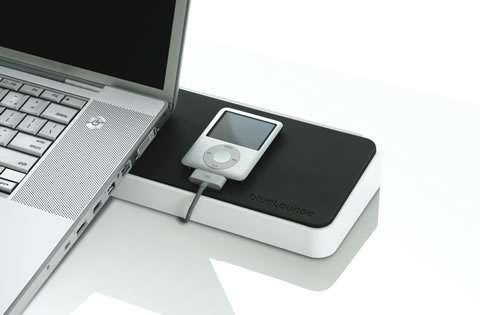 … can be an immense pain in the toochis. Actually, it is, unequivocally, an immense pain. You can’t hope to solve it, you can only hope to momentarily fend off. The ipod, camera, external hard drive, keyboard, mouse, power cable … all expected to live in peace and harmony in the vicinity of what is most likely a laptop.